Building AI Agents with LangChain: Tool Integration and Multi-Turn Conversations

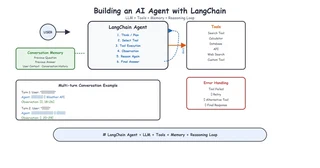
AI agents are revolutionizing how we build intelligent applications. Unlike simple chatbots, agents can use tools, maintain context, and make decisions. This guide covers building production-ready agents with LangChain.
Above: LangChain Agent architecture — User Input → Reasoning Loop → Tool Calling → Multi-turn Conversation
Table of Contents
- What are AI Agents?
- LangChain Agent Framework
- Custom Tool Development
- Memory Management
- Multi-turn Conversations
- Production Deployment
What are AI Agents?
Agents combine LLMs with tools and reasoning capabilities:
User Input → Agent (Reasoning) → Tool Selection → Tool Execution → Response
Key characteristics:
- Tool Usage - Can interact with external systems
- Reasoning - Decides which tools to use and when
- Memory - Maintains context across interactions
- Autonomy - Can chain multiple actions together
LangChain Agent Framework
LangChain provides a powerful framework for building agents:
from langchain.agents import create_openai_tools_agent
from langchain_openai import ChatOpenAI
from langchain_core.prompts import ChatPromptTemplate

# Initialize LLM
llm = ChatOpenAI(model="gpt-4", temperature=0)

# Define prompt
prompt = ChatPromptTemplate.from_messages([
    ("system", "You are a helpful assistant with access to tools."),
    ("human", "{input}"),
    ("placeholder", "{agent_scratchpad}")
])

# Create agent
agent = create_openai_tools_agent(llm, tools, prompt)
Custom Tool Development
Build tools specific to your use case:
from langchain_core.tools import tool
from typing import Optional

@tool
def search_knowledge_base(query: str) -> str:
    """Search the private knowledge base for information."""
    # Implementation here
    results = vector_store.similarity_search(query, k=3)
    return "\n".join([doc.page_content for doc in results])

@tool
def get_product_info(product_id: str) -> str:
    """Get detailed product information by ID."""
    # Database query here
    product = db.get_product(product_id)
    return f"Product: {product.name}, Price: {product.price}"

# Register tools
tools = [search_knowledge_base, get_product_info]
Tool Best Practices
- Clear Descriptions - Help the agent understand when to use each tool
- Error Handling - Gracefully handle tool failures
- Input Validation - Validate inputs before processing
- Rate Limiting - Prevent abuse of external APIs
Memory Management
Implement conversation memory for context persistence:
from langchain.memory import ConversationBufferMemory
from langchain.chains import ConversationChain

# Initialize memory
memory = ConversationBufferMemory(return_messages=True)

# Create conversation chain
conversation = ConversationChain(
    llm=llm,
    memory=memory,
    verbose=True
)

# Use in agent
agent = create_openai_tools_agent(
    llm, tools, prompt,
    memory=memory
)
Memory Types
| Type | Use Case | Trade-offs |
|---|---|---|
| Buffer | Simple conversations | Limited context |
| Summary | Long conversations | Information loss |
| Vector | Semantic search | Storage overhead |
| Entity | Entity tracking | Complexity |
Multi-turn Conversations
Handle complex conversation flows:
from langchain.agents import AgentExecutor

# Create agent executor
agent_executor = AgentExecutor(
    agent=agent,
    tools=tools,
    verbose=True,
    max_iterations=10,  # Prevent infinite loops
    handle_parsing_errors=True
)

# Conversation with context
def chat(user_input: str, conversation_id: str):
    # Load conversation history
    history = load_conversation_history(conversation_id)

    # Run agent
    result = agent_executor.invoke({
        "input": user_input,
        "chat_history": history
    })

    # Save to history
    save_conversation_history(conversation_id, user_input, result["output"])

    return result["output"]
Production Deployment
1. FastAPI Integration
from fastapi import FastAPI, HTTPException
from pydantic import BaseModel

app = FastAPI()

class ChatRequest(BaseModel):
    message: str
    conversation_id: str

class ChatResponse(BaseModel):
    response: str
    conversation_id: str

@app.post("/chat", response_model=ChatResponse)
async def chat_endpoint(request: ChatRequest):
    try:
        response = chat(request.message, request.conversation_id)
        return ChatResponse(
            response=response,
            conversation_id=request.conversation_id
        )
    except Exception as e:
        raise HTTPException(status_code=500, detail=str(e))
2. Streaming Responses
from fastapi.responses import StreamingResponse

@app.post("/chat/stream")
async def chat_stream(request: ChatRequest):
    async def generate():
        async for event in agent_executor.astream_events(
            {"input": request.message},
            version="v1"
        ):
            if event["event"] == "on_chat_model_stream":
                content = event["data"]["chunk"].content
                if content:
                    yield f"data: {content}\n\n"
        yield "data: [DONE]\n\n"

    return StreamingResponse(generate(), media_type="text/event-stream")
3. Error Handling
@app.middleware("http")
async def error_handler(request, call_next):
    try:
        response = await call_next(request)
        return response
    except Exception as e:
        logger.error(f"Agent error: {e}")
        return JSONResponse(
            status_code=500,
            content={"error": "Internal server error"}
        )
Real-World Example: Agricultural Q&A Agent
Here’s how I built an agricultural knowledge base agent:
from langchain.agents import create_openai_tools_agent
from langchain.tools import Tool

# Define agricultural tools
tools = [
    Tool(
        name="SearchKnowledgeBase",
        func=search_agricultural_knowledge,
        description="Search private agricultural manuals for crop diseases, treatments, and best practices"
    ),
    Tool(
        name="GeneralAgriculturalKnowledge",
        func=get_general_knowledge,
        description="Get general agricultural information when private knowledge base doesn't have the answer"
    )
]

# System prompt emphasizing private data priority
system_prompt = """You are an agricultural expert assistant.

IMPORTANT: Always search the private knowledge base FIRST. Only use general knowledge if the private search returns no relevant results.

When answering:
1. Cite the source document when possible
2. Be specific about crop names, disease symptoms, and treatments
3. If unsure, say "I recommend consulting a local agricultural expert"
"""
Conclusion
Building AI agents requires:
- Tool Design - Clear, well-documented tools
- Memory Management - Appropriate memory strategy for your use case
- Error Handling - Graceful failure management
- User Experience - Streaming and clear feedback
The complete agricultural agent code is available on GitHub.
Questions? Reach out on GitHub or email me at yjs_0831@qq.com!
