Building a RAG Pipeline with LangChain: From Document Processing to Vector Search

Retrieval-Augmented Generation (RAG) has become the standard approach for building AI applications that need to access specific knowledge bases. This guide walks through building a complete RAG pipeline from scratch using LangChain.
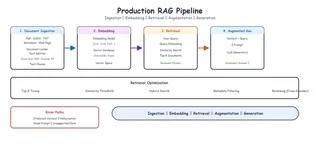
Above: Production RAG Pipeline — Document Ingestion → Embedding → Retrieval → Augmented Generation → Output
Table of Contents
- What is RAG?
- Document Processing
- Vector Storage
- Retrieval Strategies
- Hallucination Prevention
- Streaming Interface
- Production Considerations
What is RAG?
RAG combines the power of large language models with external knowledge retrieval:
User Query → Retrieval → Context + Query → LLM → Answer
This approach solves the core problem of LLMs: they can only answer based on their training data. RAG allows them to access up-to-date, domain-specific, or private information.
Document Processing
The first step is preparing your documents for retrieval:
from langchain.document_loaders import PyPDFLoader
from langchain.text_splitter import TokenTextSplitter

# Load documents
loader = PyPDFLoader("knowledge_base.pdf")
documents = loader.load()

# Split into chunks
text_splitter = TokenTextSplitter(
    chunk_size=500,
    chunk_overlap=50,
    encoding_name="cl100k_base"  # OpenAI tokenizer
)

chunks = text_splitter.split_documents(documents)
Key Considerations
- Chunk Size - Balance between context and retrieval accuracy
- Overlap - Prevent important information from being split across chunks
- Metadata - Preserve source information for attribution
Vector Storage
Store embeddings for efficient similarity search:
from langchain.embeddings import OpenAIEmbeddings
from langchain.vectorstores import Redis

# Initialize embeddings
embeddings = OpenAIEmbeddings()

# Create vector store
vector_store = Redis.from_documents(
    documents=chunks,
    embedding=embeddings,
    redis_url="redis://localhost:6379",
    index_name="knowledge_base"
)
Choosing a Vector Store
| Store | Performance | Features | Best For |
|---|---|---|---|
| Redis | High | Real-time updates | Production |
| Pinecone | High | Managed service | Enterprise |
| FAISS | Medium | Local, free | Development |
| Chroma | Medium | Simple setup | Prototyping |
Retrieval Strategies
Implement smart retrieval with LangChain:
from langchain.retrievers import ContextualCompressionRetriever
from langchain.retrievers.document_compressors import LLMChainExtractor

# Basic similarity search
retriever = vector_store.as_retriever(
    search_type="similarity",
    search_kwargs={"k": 5}
)

# Advanced: Contextual compression
compressor = LLMChainExtractor.from_llm(llm)
compression_retriever = ContextualCompressionRetriever(
    base_compressor=compressor,
    base_retriever=retriever
)
Hallucination Prevention
Critical for production RAG systems:
from langchain.prompts import ChatPromptTemplate

system_prompt = """You are an agricultural expert. Answer questions based ONLY on the provided context. If the context doesn't contain enough information, say "I don't have enough information to answer this question."

Context: {context}
"""

prompt = ChatPromptTemplate.from_messages([
    ("system", system_prompt),
    ("human", "{input}")
])
Three-Layer Prevention
- Retrieval Filtering - Only pass high-relevance documents
- Prompt Engineering - Force model to cite sources
- Output Validation - Verify responses against source data
Streaming Interface
Implement real-time responses with FastAPI:
from fastapi import FastAPI
from fastapi.responses import StreamingResponse
import asyncio

app = FastAPI()

@app.post("/chat")
async def chat(query: str):
    async def generate():
        async for chunk in chain.astream({"input": query}):
            yield f"data: {chunk.content}\n\n"
            await asyncio.sleep(0.01)  # Simulate typing
        yield "data: [DONE]\n\n"

    return StreamingResponse(
        generate(),
        media_type="text/event-stream"
    )
Production Considerations
1. Error Handling
try:
    response = await chain.ainvoke({"input": query})
except Exception as e:
    logger.error(f"RAG error: {e}")
    return {"error": "Failed to generate response"}
2. Caching
from langchain.cache import RedisCache

cache = RedisCache(redis_url="redis://localhost:6379")
llm = OpenAI(cache=cache)
3. Monitoring
Track key metrics:
- Retrieval accuracy
- Response latency
- User satisfaction
- Hallucination rate
Conclusion
Building a production RAG system requires attention to:
- Document Quality - Good preprocessing is crucial
- Retrieval Strategy - Balance precision and recall
- Hallucination Prevention - Multi-layered approach
- User Experience - Streaming and error handling
The complete code is available on GitHub.
Questions? Reach out on GitHub or email me at yjs_0831@qq.com!
