OpenAI Multimodal AI: Working with Text, Images, and Documents

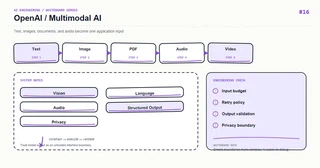
Whiteboard: OpenAI — OpenAI Multimodal AI.
The hard part of multimodal applications is input governance, not uploading a file. Each media type needs type checks, size limits, safety screening, authorization, and traceable preprocessing.
Core mental model
The flow is Input → Normalize → Multimodal Model → Structured Output → Application. Images may need resizing, PDFs may need OCR/layout parsing, and audio may need transcription with timestamps.
Key mechanics
Decouple file storage from model requests: create a short-lived object reference, scan it, and send only the minimum resolution or pages needed. Store modality, preprocessing version, and evidence regions.
Python example
from pydantic import BaseModel, Field

class ImageInsight(BaseModel):
    objects: list[str] = Field(default_factory=list, max_length=20)
    summary: str = Field(max_length=1000)
    confidence: float = Field(ge=0, le=1)

def validate_upload(content_type: str, size: int) -> None:
    if content_type not in {"image/png", "image/jpeg", "application/pdf"}:
        raise ValueError("unsupported_media_type")
    if size > 10 * 1024 * 1024:
        raise ValueError("file_too_large")
Course focus
This article turns the whiteboard into explicit engineering boundaries: define inputs and outputs first, then decide how state, failures, and observability work. The examples use Python and focus on durable design principles rather than a particular provider version; verify APIs against the documentation for your installed dependencies.
Engineering practice
- Keep business rules in the application layer instead of hiding them in untestable prompts or route handlers.
- Add timeouts, bounded retries, and idempotency keys to external calls; retries are not a complete error strategy.
- Record a request id, latency, input version, model/index version, and outcome without logging sensitive raw content.
- Use a small fixed regression set first, then monitor quality and cost with sampled production traffic.
Common mistakes
- Drawing only the happy path and omitting timeouts, empty results, rate limits, and rollback paths.
- Letting one function parse input, call providers, build prompts, and persist data.
- Replacing typed contracts with string conventions that can only be verified by manual integration.
Production checklist
- Inputs, outputs, and error responses have explicit schemas
- External dependencies have timeouts, bounded retries, rate limits, and fallbacks
- Logs, metrics, and traces can be correlated to one request
- Critical paths have unit tests, integration tests, and offline evaluation samples
- Secrets, user content, and provider responses follow least-privilege and privacy rules
Practice
Implement the smallest loop shown on the whiteboard. Inject a timeout, an empty result, and a malformed payload, then check whether the system remains stable and diagnosable. Add one metric that proves your optimization improved quality or latency.
Hands-on exercise
Build an invoice-image-to-JSON experiment. Test a clear image, rotated image, low-resolution image, and oversized PDF; record field accuracy, latency, and cost.
Conclusion
An AI feature becomes maintainable when every arrow on the whiteboard maps to an input, an output, and a failure strategy.
